How to keep a terminal session alive after closing the terminal
Close a terminal window and the build running inside it dies. That is not a bug: the kernel sends SIGHUP to the foreground process group when the controlling terminal goes away, and most programs take the hint and exit. Everything below is a way of making sure the process is not attached to a terminal that can disappear.
nohup and disown — for one command, right now
# start it detached from the hangup signal
nohup ./long-build.sh > build.log 2>&1 &

# or rescue something already running: Ctrl+Z, then
bg
disown -h %1
This is the smallest possible fix and it works everywhere. What you lose is the session: you cannot get back to an interactive prompt, you are reading a log file instead of watching output, and anything that wants a TTY — a prompt, a progress bar, an editor — will misbehave.
screen — the old reliable
screen -S build      # start a named session
# Ctrl+A then d       detach
screen -ls           # list sessions
screen -r build      # reattach
GNU screen keeps a real PTY alive in the background, so you get your interactive session back exactly as you left it. It is installed almost everywhere and it has been doing this since the 1980s.
tmux — what most people use
tmux new -s build    # start a named session
# Ctrl+B then d       detach
tmux ls              # list sessions
tmux attach -t build # reattach
tmux does the same thing with a better split and window model, a scriptable config, and a large plugin ecosystem. If you are on Linux or macOS and you do this regularly, tmux is the answer, and it is free.
The costs are real, though: a second keybinding layer on top of the one your terminal already has, a prefix key to press before everything, a config file to maintain, and a set of concepts — sessions, windows, panes — that sit beside the tabs and panes your terminal already draws. On Windows it is awkward at best.
A terminal that detaches on its own
The fourth option is for the terminal to run its shells outside the UI process in the first place, so closing the window is not an event the shell can notice. Cross Platform Terminal does this behind one checkbox: Settings, then Widgets, then Terminal — “Keep shells running when the app closes”.
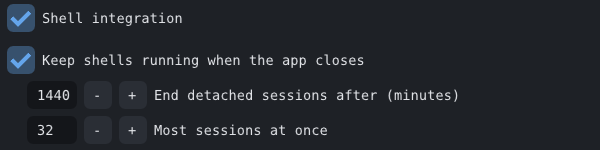
With it on, shells run in a background process rather than inside the app. Close CPT with a server or a build running, reopen it, and the pane comes back with its scrollback and the process still going. There is no prefix key and no second set of keybindings, because it is the same panes and tabs you were already using.
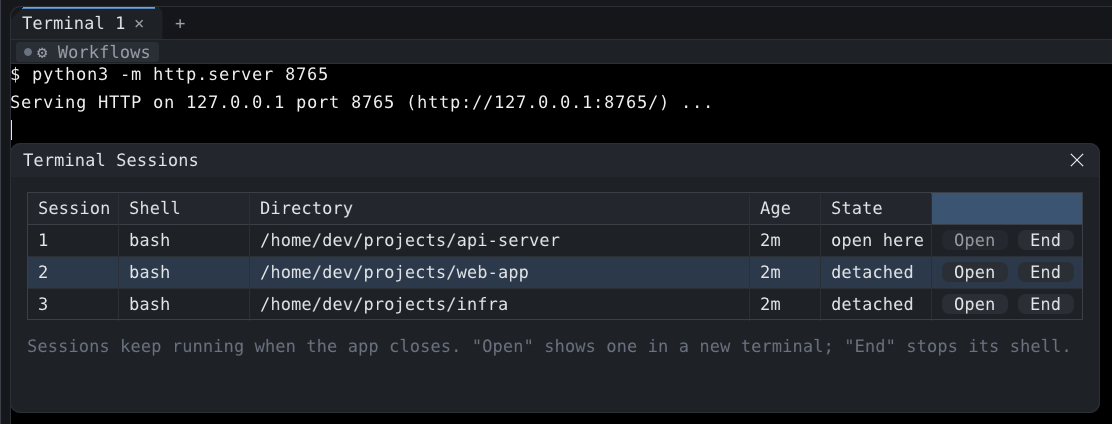
- Closing a pane that is sitting at a prompt ends that shell, as you would expect. Closing one with something still running asks first: keep it running in the background, or end it. Closing the whole app never asks — everything is kept.
- Sessions are local to the machine and to the profile. This is not a replacement for tmux over SSH, which is a different problem.
- Every session shows up in the Sessions widget, behind the Sessions button in the title bar, where Attach puts it back in a pane and End stops it.
Which to pick
- One command, one time: nohup.
- Over SSH, on a server: tmux or screen. Nothing local can help you there.
- Every day, on your own machine, on Linux or macOS: tmux is free and very good.
- Every day, on your own machine, and you would rather not run a multiplexer at all: that is what CPT's detachable sessions are for.